
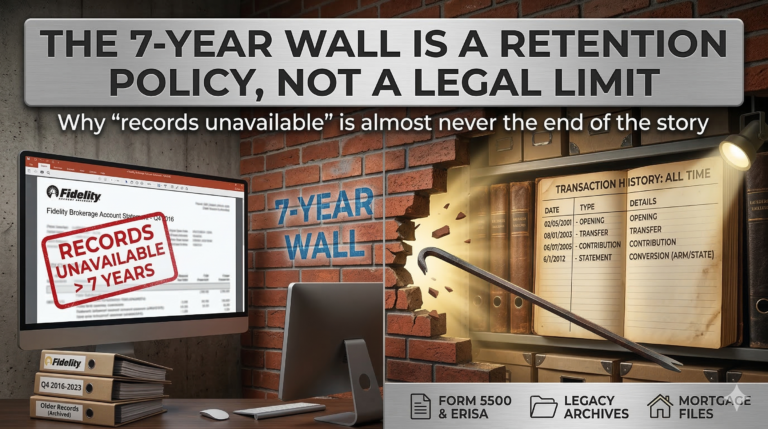
Why “records unavailable” is almost never the end of the story.
Your client brought $120,000 into the marriage. Fifteen years later, the retirement account is worth $700,000. The separate property argument could save your client hundreds of thousands of dollars. But you need the account history to prove it.
So you call Fidelity. They tell you statements are only available for the last seven years. You try Vanguard. Same answer. The account rolled over at some point, the recordkeeper changed, and now everyone acts like the history disappeared.
Here’s what most attorneys don’t realize: the seven-year wall is a records retention policy for formatted PDF statements. It has nothing to do with how long the underlying data actually exists.
Statements and Transaction Data Are Two Different Things
When you log into a retirement account portal and click the “Statements” tab, you’re looking at formatted PDF documents. Those are stored in a web portal with a rolling retention window, usually five to seven years.
But there’s another tab most people skip: “Transaction History” or “Activity.” That tab pulls from the live database, not the PDF archive. And it often goes back to account inception.
The difference matters. The statements tab gives you a formatted quarterly snapshot. The transaction history tab gives you every contribution, withdrawal, loan, transfer, and fee the account has ever processed. On most platforms (Fidelity NetBenefits, Vanguard, Empower), you can set the date range to “All Time,” download the result as a CSV, and get data that predates the oldest available statement by a decade or more.
That means your client may already have access to data everyone told you was gone. They just need to look in the right place.
When the Portal Doesn’t Go Back Far Enough
Sometimes the transaction history tab has limits too, especially after a platform migration. When Prudential’s retirement business moved to Empower in 2021 and 2022, thousands of plans went through a data conversion. The current Empower platform may only show records from the migration date forward. The pre-conversion data landed in an archived system that a standard search doesn’t reach.
The same thing happens whenever a plan changes recordkeepers. The new platform has the data from the conversion date forward. The old platform (or its archive) has everything before that. And unless your records request specifically calls out legacy and pre-conversion systems by name, the response team will search the current platform and call it done.
This is where the language of your subpoena or demand letter determines what you get back. A generic request for “all account records” will produce whatever the standard search returns. A request that explicitly encompasses “any pre-conversion and legacy records maintained in archived systems associated with the former [prior administrator]” forces a different, deeper search.
The Part Nobody Talks About: Form 5500
Before you send any subpoena, there’s a step that prevents one of the most common rejection reasons: getting the legal plan name wrong.
The plan name your client uses (“my 401k at work”) is almost never the legal plan name. And if the name on your subpoena doesn’t match the name on file, the recordkeeper can reject it on a technicality.
The fix takes five minutes. Go to efast.dol.gov, search by employer name or EIN, and pull the most recent Form 5500. Line 1a gives you the exact legal plan name. Line 2a gives you the plan sponsor. Schedule C gives you the current recordkeeper.
While you’re there, pull Form 5500 filings from multiple years. Compare Schedule C across those years. If the recordkeeper changed (say, from Prudential to Empower in 2022), you now know there was a conversion, which means there’s a conversion file, and that file is one of the most valuable documents you can get in a tracing case.
When the Recordkeeper Truly Stonewalls
Sometimes you do everything right and the recordkeeper still says no. “Records prior to [date] are unavailable. We cannot fulfill this portion of your request.”
There’s a tool most attorneys don’t use in this situation: ERISA Section 209. It requires employers to maintain records “sufficient to determine benefits due” with no time limit. Not seven years. Not ten years. Indefinitely.
The demand doesn’t go to the recordkeeper. It goes to the employer (the plan sponsor on Line 2a of the Form 5500). The employer has an independent obligation to maintain these records, separate from whatever the recordkeeper’s retention policy says. And the penalty for non-compliance starts at $28 per employee per day.
That changes the conversation. The employer, facing potential liability, often discovers that the records exist after all, or produces payroll data showing year-by-year deferrals that gives you a defensible reconstruction basis.
The Mortgage File Nobody Checks
One more place to look when all else fails: the mortgage file.
If your client (or the other party) bought a home or refinanced during the marriage, the lender required asset verification as part of the application. That means retirement account statements were submitted and filed with the loan documents. Lenders retain those files for years after closing.
A single subpoena to the mortgage lender can produce retirement account statements from a date when the recordkeeper says nothing exists. If there were multiple applications or refinances, you get multiple snapshots from different points in time.
It’s not guaranteed, but it’s one of the smartest backup sources available, and almost nobody thinks to check it.
—
Every one of these situations comes down to the same thing: “records unavailable” usually means the standard search didn’t look in the right place. The data is almost always still there. The question is whether the request is specific enough to reach it.
What’s the oldest retirement account data you’ve ever been able to recover on a case? I’m always curious what’s out there.